



Dual booting Ubuntu 10.10 Maverick Meerkat and Windows 7 is fairly easy. If you don't believe me, just read on!
Step 1 Get Windows 7
 First thing's first! Ye can't install Windows 7 without an installation disk, can ya? So if your PC did not come with Windows 7 pre-installed, grab a disk here from Microsoft.com. Remember, it burns holes in your pocket.
Step 2 Get Ubuntu 10.10
 Now the fun part begins. You download a complete operating system from a legitimate site, yet you don't pay for it. Because it's FREE (as in beer, ;-) ). Get a copy of the Ubuntu ISO image here. Or if you prefer, download Ubuntu via BitTorrent. BitTorrent is my preferred method because downloads are hash checked automatically. So they are never corrupted.
Step 3 Prepare Windows
 If you have Windows 7 pre-installed, you don't need this step. There is a good HowTo on installing windows right inside Microsoft's site. Here's a link.
Step 4 Prepare Ubuntu
I assume you have a fully working Windows 7 right now. Follow this steps to install Ubuntu:-
- Make sure you have at least one partition empty on your hard drive. This is where you are going to put Ubuntu. It is desirable to have more than 2GB of space on this partition.
- Burn Ubuntu ISO image to a disk (easier) OR create a bootable USB stick (harder but Unetbootin makes life easy, :) ). From here on I'll assume you have burnt a disk. Alternatively, see the end of this article for a small HowTo on Unetbootin.
- Enter your BIOS settings page and make sure you have your CD-DVD ROM listed as your first boot device. Save settings and exit.
- Put the Ubuntu disk in tray and restart your PC. You'll see Ubuntu running directly from the disk. You need not worry at this point. Since no changes are made to your PC.
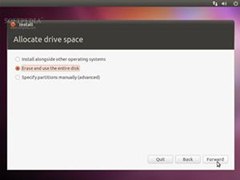 Click on Install Ubuntu and follow on screen instructions until you reach the Allocate Drive Space dialogue. Take a deep breath here.
Step 5 The Tricky Part
Please read the Warnings section first!
Now follow the screenshots carefully:-
- Select Specify Partitions Manually (advanced).
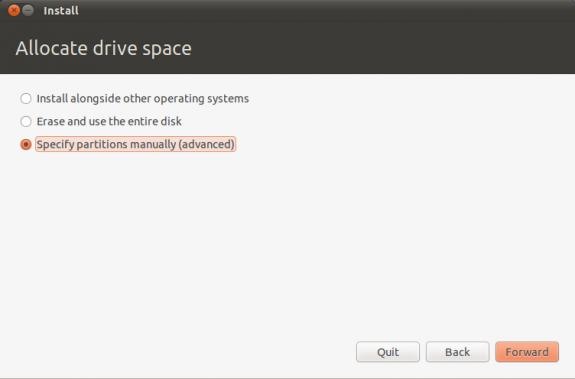
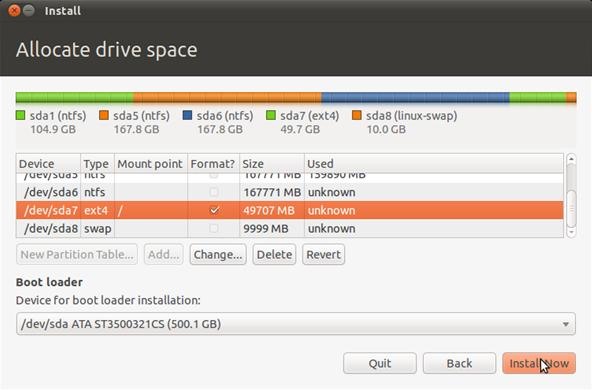
- Delete the partition that is Already Empty! Here /dev/sda7 is the partition I am deleting. This step might be confusing for beginners. Just make sure you remember the size of the empty partition you prepared. I had a 60GB partition, so I am deleting that one. Please don't delete anything unless you are 100% sure. Leave your Windows partition as it is.
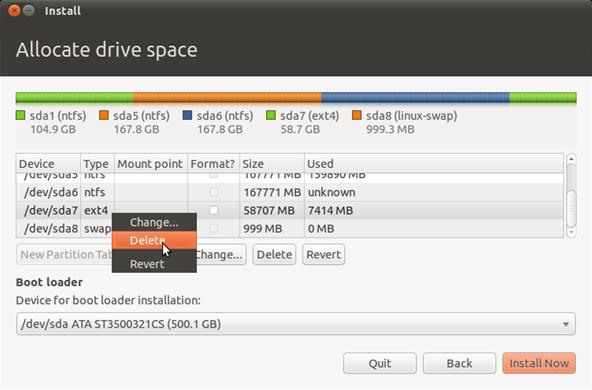
- At this point you'll see some free space.
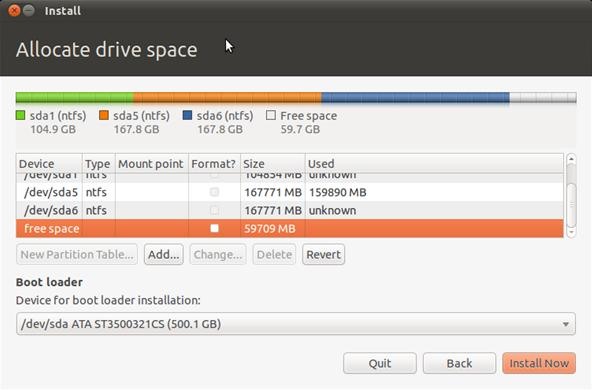
- Click Add while free space is selected. It will show the Create A Partition dialogue. Make sure you leave some space for swap area here. I left 1GB. So, instead of creating a partion of size 59709 MB, I set the size to 49709 GB.
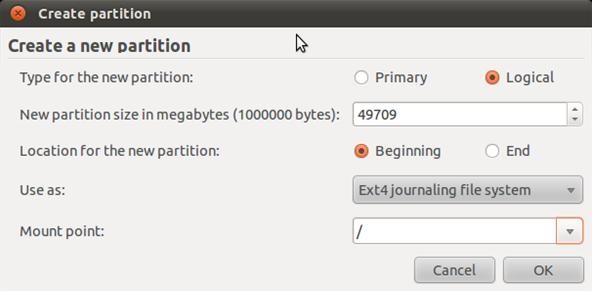
- Now you'll have an Ext4 Partition AND some free space. Select free space and click Add (again!).
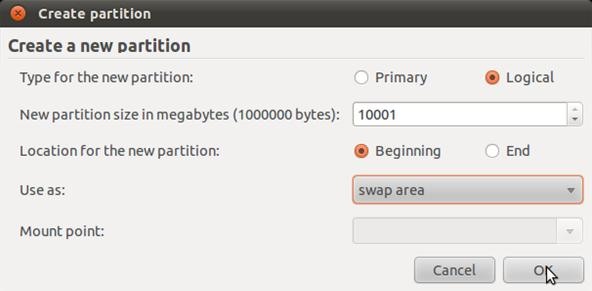
- This is what your partition table should look like. At this stage you should have one Ext4 and one swap partition. Click Install Now.
- The rest part should be fairly easy. You've passed the toughest hurdle.
Warnings
- Please be careful with the previous steps. I am going to partition the hard disk manually. A mistake here can destroy valuable data saved in your hard disk.
- Also, it is assumed that you have at least one empty partition with more than 2GB of space ready. We are going to reformat that partition. And unless you install something similar to Ext2IFS under Windows, you will not be able to see the partition from within Windows. This is normal.
Step 6 Booting Ubuntu From USB Sticks. Unetbootin Saves The Day!
Here's a good HowTo on Unetbootin. Please ask me if you have troubles following it. It is verrry simple, trust me.
You can visit my profile at Hubpages.com.
Just updated your iPhone? You'll find new features for Podcasts, News, Books, and TV, as well as important security improvements and fresh wallpapers. Find out what's new and changed on your iPhone with the iOS 17.5 update.


20 Comments
Finished my second blog on how to remove unwanted facebook applications. It's in the voting section.
https://www.wonderhowto.com/how-to-remove-unwanted-facebook-applications-0124030/
hey! good job \m/ :)
<3
good job!!
Good Job!! Very nicely written...
Nice article!
Thanks. I am really happy that you liked it, :)
What happens if you select the 'install alongside other operating systems'?
In that case Ubuntu automatically creates new partions is your drive taking free space from other drives. Not a good idea. I want my drive partitioned my way.
I did that, does it have any influence on performance of the computer?
also I don't get a menu to choose Ubuntu when starting the computer. any solution to that?
thanks a lot ! it was very usefull !
i have a problem, i already had my windows 7 installed, and then i downloaded my ubuntu and made a bootable usb stick with ubuntu on it. i then went through all the installation steps that you have given and i went through them with double checking to make sure i didnt miss anything off. i got all the way through the installation steps and got to the end where it said reboot. i then rebooted took out my usb stick when it told me to then rebooted the computer. when my comptuer loaded back up it went straight into windows 7 with out giving me the option of going on ubuntu or windows 7 just ran windows 7, i want this option please can you help
Do you have multiple hard disks? I think you have installed GRUB (the Linux bootloader) on a different partition than a boot partition.
But no worries. There is an excellent tool called EasyBCD which will solve your problem. And you will be utilizing the Windows Bootloader to boot into Linux.
Read the guide here - http://neosmart.net/wiki/display/EBCD/Linux
a problem occur when I click Install Now. There's a box pop up saying that No root system is defined!
That's because you did not specify a root partition - that has a mount point '/'.
That helped thanks!
hello my prof said to us that, we need to dual boot our laptop with windows 7 drive c: with 70 gb and drive d: with 70 gb also then the rest of the gb is for ubuntu, how can i do this one??
Hi, I'm interested if anyone knows how to uninstall windows and keep pre-installed Linux Ubuntu 11.10, of course, were installed side by side. thanks for answer... or U can send me answers on aca.k@aol.com, thanks again...
hi...
im had ubuntu 10.10 how to make dual boot with out uninstall ubuntu????
is this procedure/steps are only for UBUNTU 10.10 or any other version of Ubuntu ??
Share Your Thoughts